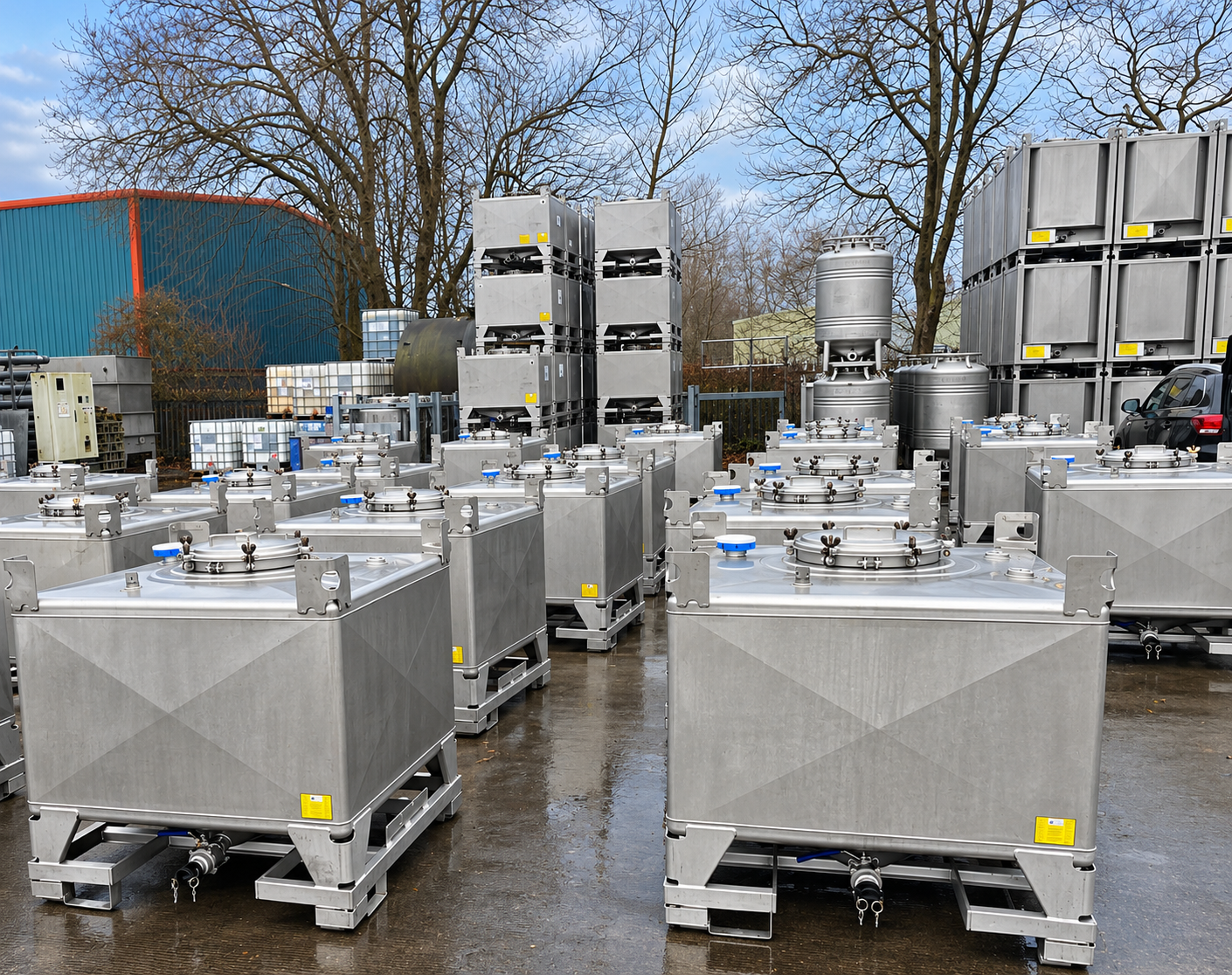
Steel IBCs play a critical role in industrial supply chains, particularly in the chemical industry and industrial logistics, where they are used to safely store and transport liquids. As high-value assets, keeping track of
their locations and movements is essential to reducing losses and improving fleet utilization. With the
Packwise Smart Cap, companies can easily integrate their steel IBCs into a digital asset tracking system,
gaining greater visibility and control over their container fleets.
Installation is straightforward and can be completed in just a few simple steps. Extensive technical modi-
fications to the container are generally not required. Once installed, the collected sensor data can be used
via Packwise Flow 2.0 for Asset Tracking and planning.
In this step-by-step guide, we’ll show you how to install the Packwise Smart Cap on a steel IBC
and what points to keep in mind during the process.
Why Is Asset Tracking Important for Steel IBCs?
Steel IBCs are used in numerous industrial applications, particularly in the chemical industry and for the storage and transport of liquid substances. Manufacturers such as Azzini, Finncont, THIELMANN, Greif, UCON and SCHÄFER WERKE offer a variety of steel IBC solutions designed to meet the demands of industrial supply chains.
Thanks to their robust construction, durability, and reusability, steel IBCs are particularly well-suited for demanding industrial processes. At the same time, they are significantly more expensive to purchase than many conventional plastic IBCs. This makes it all the more important for companies to maintain visibility into their container fleets, their locations, movements and availability.
Without digital tracking, companies often rely on manual processes to monitor their container fleets.
Employees must check container locations on-site and share information with the relevant departments.
For companies managing large container fleets across multiple locations, this can be time-consuming
and prone to errors.
This is where Packwise comes in: The Smart Cap collects relevant container data and makes it available via Packwise Flow 2.0. This gives companies a better overview of their inventory and allows them to track contai-
ner movements and improve container return planning and optimize fleet utilization.
The first step toward digital Container Fleet Management is the proper installation of the Smart Cap.
Step-by-Step Guide: Installing the Packwise Smart Cap
on a Steel IBC
The installation of the Packwise Smart Cap on a steel IBC is designed so that it can be carried out without significant technical effort. Key factors include selecting a suitable mounting position, carefully preparing
the surface, and correctly securing the sensor.
Step 1: Select a Suitable Mounting Position on the Steel IBC
Before attaching the Packwise Smart Cap, a suitable position on the steel IBC must first be selected. For
direct adhesive mounting, a sufficiently large, flat surface on the top of the container is ideal. Care must
be taken to ensure that the Smart Cap can be securely fastened and is not obstructed by closures or other structural elements.
The exact position depends on the design of the steel IBC and the specific installation requirements.
It is important that the intended surface is suitable for mounting and does not impair the sensor’s function.
Step 2: Clean the Mounting Surface
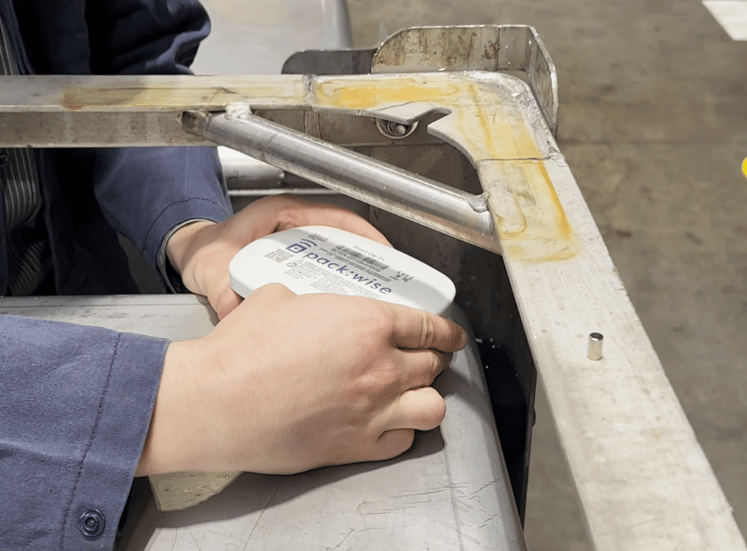
Next, the intended mounting surface must be carefully cleaned. Particular care must be taken to ensure that
the surface is completely free of dust, dirt, grease, and other residues. Contaminants can impair the adhesive’s bonding ability and prevent the Smart Cap from remaining securely attached to the container over the long term. After cleaning, the surface should be completely dry. A clean, dry and as level as possible mounting surface is essential for reliable sensor attachment.
Step 3: Activate the Packwise Smart Cap
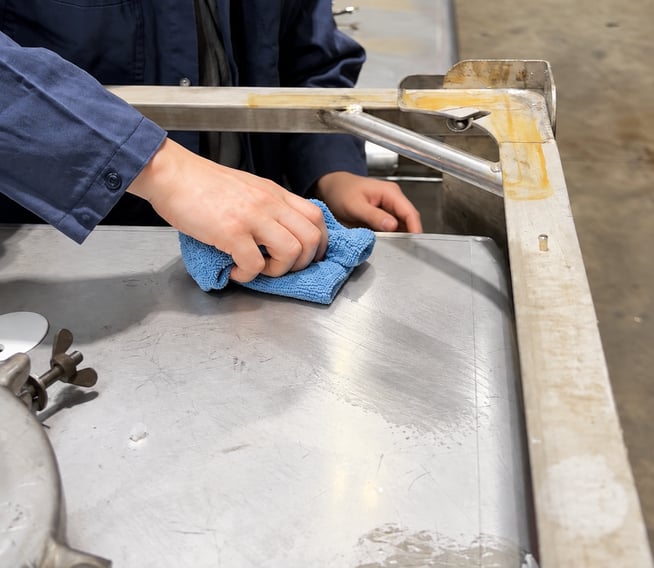
Before installing the Packwise Smart Cap on the steel IBC, the sensor must be activated. To do this, remove
the small magnet located on the side of the Smart Cap. Removing the magnet activates the device, allowing
it to collect relevant container data for digital asset tracking.
Step 4: Prepare the Smart Cap for Installation
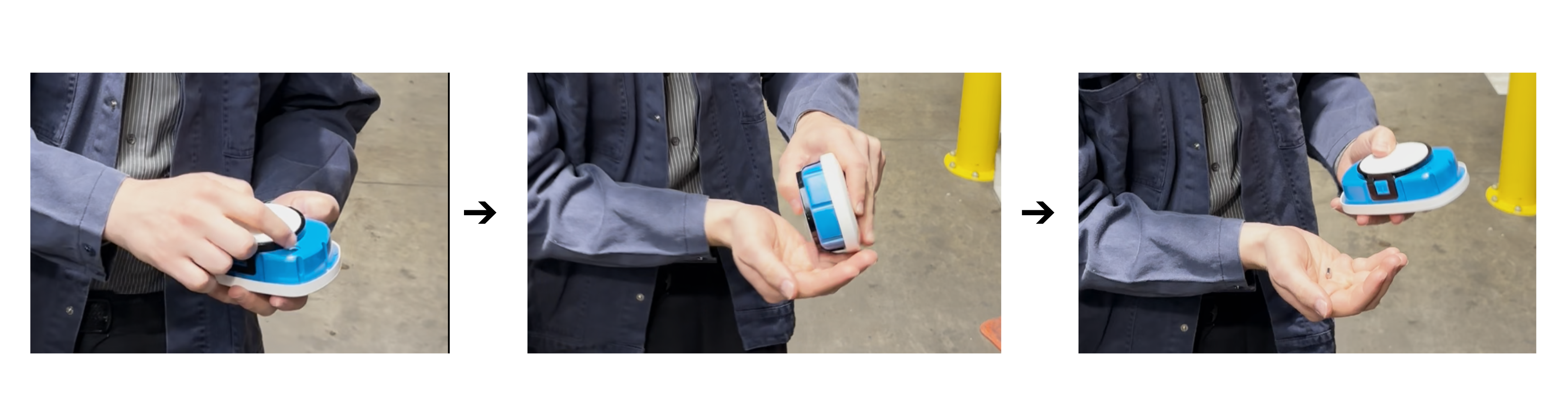
On the underside of the Smart Cap is a white adhesive surface covered by a protective film. Carefully remove
this film to expose the adhesive surface. Avoid touching the adhesive surface with your fingers. Dirt, dust, or
other residues can impair adhesion and thus make attachment more difficult. After removing the protective film, the Smart Cap is ready for installation.
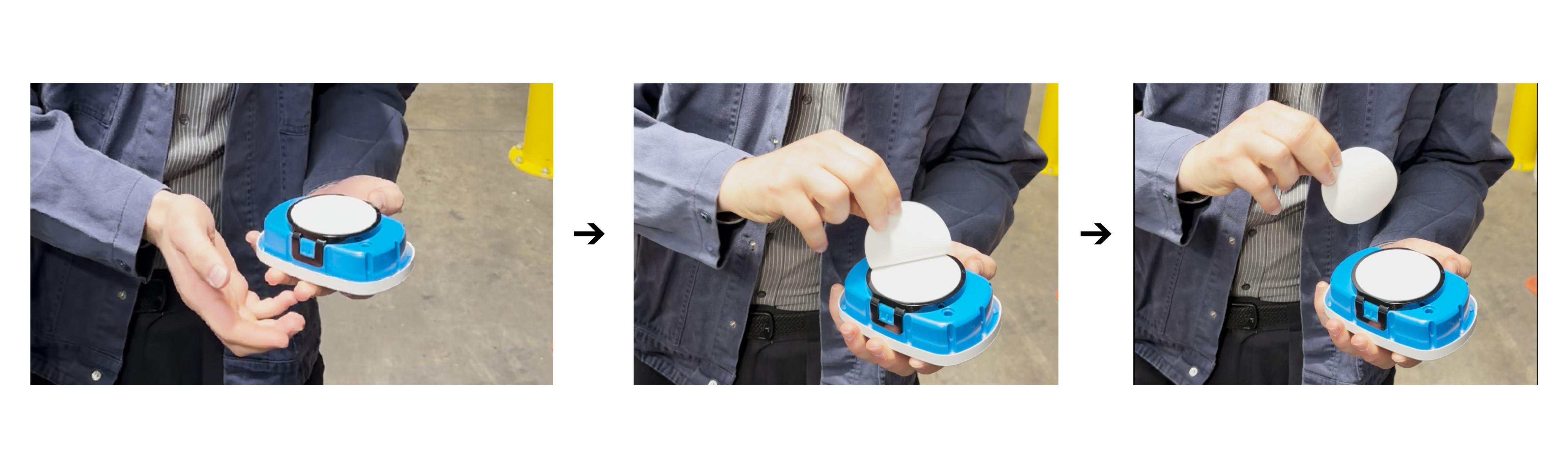
Step 5: Attach the Smart Cap to the Steel IBC
Once the mounting surface has been prepared, the Smart Cap can be attached. To do this, place the sensor
with the exposed adhesive surface facing down on the designated spot. Then press the Smart Cap evenly
against the container surface for approximately 5–10 seconds. During this step, it is important to position the sensor directly at the intended location and avoid moving it afterward. The adhesive mounting method allows
the Smart Cap to be attached to the steel IBC without any additional mechanical modifications, provided the mounting surface is suitable.
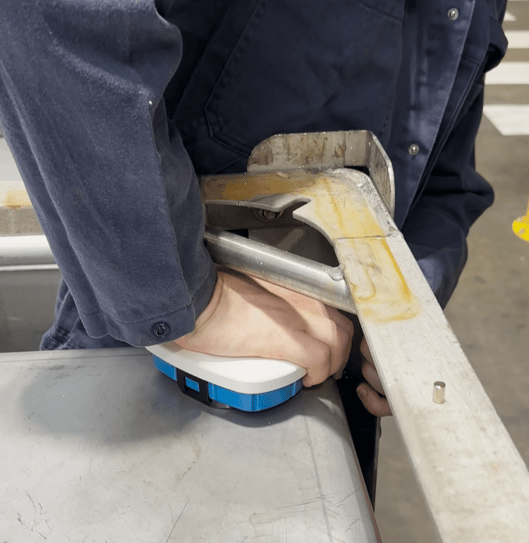
Step 6: Check the Attachment and Complete the Installation
After installation, check to ensure that the Smart Cap is securely seated on the steel IBC. Make sure that
the sensor is fully in contact with the designated surface and that there are no visible signs of detachment
at the adhesive surface. If the Smart Cap is properly secured, the mechanical installation is complete.
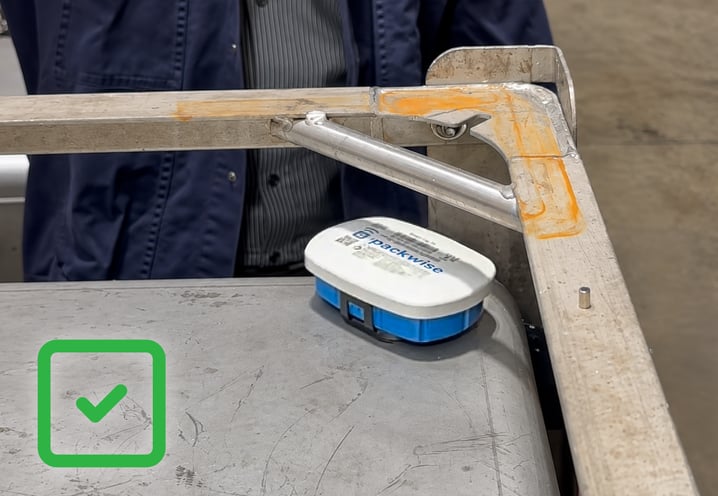
Step 7: Connect the Smart Cap to Packwise Flow 2.0
Once the Smart Cap has been installed, the next step is to connect it to the container digitally. Packwise offers
the Packwise Flow Link app, available on the Google Play Store and the Apple App Store.
Using the app, you can assign the Smart Cap to the corresponding steel IBC and connect it to Packwise Flow 2.0. This ensures that the collected data is associated with the correct container. The platform provides a centralized overview of container locations, movements, and inventory information, helping companies manage their container fleets more efficiently.
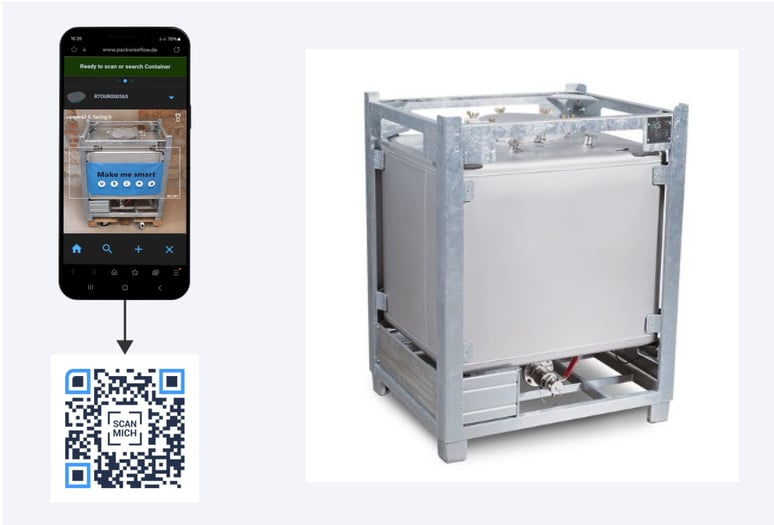
In addition to this step-by-step guide, an installation video is available on our YouTube channel. In it, we clearly demonstrate how to attach the Packwise Smart Cap to a steel IBC. This allows you to visually follow the entire installation process.
What Are the Benefits of Using the Packwise Smart Cap on a Steel IBC?
Installing the Packwise Smart Cap turns a conventional steel IBC into a digitally trackable asset. Instead of
relying on manual inventory checks or incomplete location information, companies gain greater visibility into
their container fleets and can track container locations and movements more efficiently.
Asset tracking offers various advantages, especially for larger container fleets:
- Protection of high-value container inventories: Digital tracking allows companies to keep a closer eye
on their costly steel IBCs. Containers are easier to locate, and the risk of container loss is reduced.
- Greater transparency regarding locations and movements: Location data makes it possible to track the whereabouts of individual steel IBCs. Companies can see where their containers are and gain a better
overview of their entire container fleet.
- Optimized container return cycles: Digital location tracking supports the targeted return and reuse of
steel IBCs. This allows existing containers to be used more efficiently, reduces container idle time and
avoids unnecessary new purchases.
- Reduced Manual Monitoring: Thanks to digital asset tracking, container locations and inventories need
to be checked manually less frequently. This saves time, reduces organizational effort, and lightens the workload for employees.
- Centralized data management with Packwise Flow 2.0: The recorded location and container information
is consolidated in a digital environment. This enables companies to manage their steel IBC fleets across multiple locations, track container movements, and make data-driven decisions.
Conclusion: Just a Few Simple Steps for
Greater Transparency
Installing the Packwise Smart Cap on a steel IBC demonstrates just how easy it can be to get started with
digital Container Fleet Management. With the right preparation, a suitable mounting position, and careful fastening, the sensor can be installed in just a few steps.
The real added value comes from connecting it to Packwise Flow 2.0. The software makes the collected data actionable and helps companies manage inventory more transparently, optimize container return processes,
and identify cost-saving opportunities. In this way, a simple sensor installation becomes an important step toward
an intelligent, connected supply chain.
hubergroup: A Long-Standing Packwise Customer
A great example of Packwise technology in action is our long-standing partnership with hubergroup. The global company uses Packwise's asset tracking solutions to gain greater visibility into its container fleet and optimize container circulation.
By digitally tracking container locations and movements, hubergroup can improve return processes, increase container utilization, and make better use of existing assets. This helps the company manage its container fleet more efficiently while reducing unnecessary costs.
Want to learn more? Read the hubergroup success story to discover how Packwise supports smarter
container management.
Ready to Track Your Steel IBCs Digitally?
Looking to improve visibility into your steel IBC fleet and optimize container management? Our experts are
here to help with installation guidance and solutions tailored to your specific requirements.
Schedule a consultation with our team and discover how Packwise can help you take control of your
container fleet with digital asset tracking.